
Job Application Tracker Template: Track Your Funnel and Raise Your Interview and Offer Rates
This job application tracker template is the core spreadsheet of the Data-Driven Job Search method. It tracks every application in your job search abroad, so you can see your numbers at each stage and improve your chances of getting interviews and offers. Below is what’s inside and how to use it.
Get the job application tracker template
Get the sheet here: template link (it makes a copy in your Google Drive; the template itself is in Chinese).
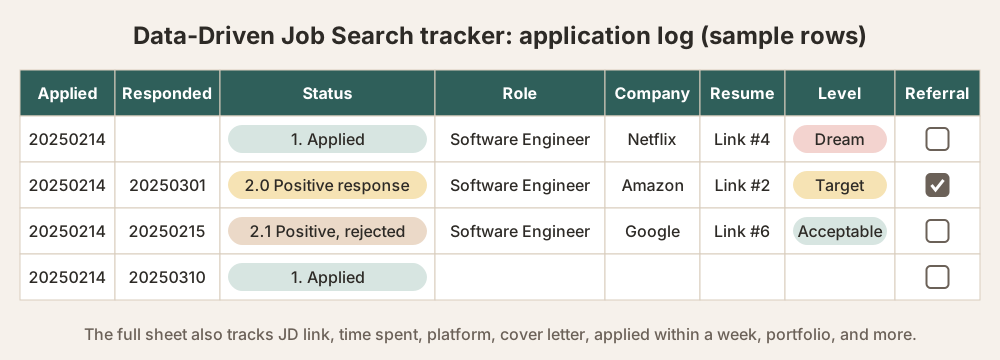
It’s a job search tracker spreadsheet in Google Sheets that helps you track and analyze your job search. It has three tabs.
✅ 1.0 Overview: see your results and conversion rates at a glance
What it does
This tab automatically summarizes where your applications stand, so you can check the count and conversion rate (%) at each stage.
What the columns mean
- Count: the total number at each stage
- % conversion: the share that moved on from the previous stage to this one
- Notes: room for special cases, such as “silent for more than 7 days”
What you can do with it
- Spot the bottleneck at each stage (for example, a lot of “read but no reply”)
- Write down your decision criteria and job search goals (for example, that you’re currently focusing on Angular roles in Taiwan)
The stages explained
- 1.0 Applications sent: every time you actively submitted your resume, whether or not you heard back
- 1.1.1 Silent for more than 7 days: no reply at all a week after applying; treat it as gone cold. A reminder to decide whether to follow up or let it go
- 1.1.2 Rejected unread: the company rejected you based on your resume without engaging, usually an automated email or a record showing the resume was never opened
- 1.3 Resume read: there’s evidence they read your resume, but no next step yet (for example, a “viewed” notification on LinkedIn)
- 1.4 Rejected after reading: they read it and replied with a rejection
- 2.0 Positive response: any positive reaction, such as an invitation to talk further or to schedule an interview
- 2.1 Rejected after a positive response: turned down after further contact (such as filling in a questionnaire or an initial chat)
- 3.0 Interview: you set a time with them and completed a video or in-person interview
- 3.1 Rejected after interview: turned down after one or more interview rounds
- 3.2 Reached the final round: you’re in the final interview but don’t have an offer yet; you may still be rejected
- 4.0 Offer 🎉: you received a formal offer letter
📋 2.0 Application log: record every application, every day
One row = one application
After each application, record:
- Applied date / response date: in yyyymmdd format (for example, 20250214)
- Status: pick from the dropdown, such as “Applied,” “Positive response” or “Rejected after interview”
- Job title and company: the role you applied for and the company
- JD link: the original link to the job description, or a screenshot
- Resume version: a link to the resume you sent (so you can see which versions work best)
- Time spent: minutes from reading the JD to finishing the application
- Platform: for example LinkedIn, 104 Job Bank (Taiwan’s largest job site) or the company’s careers page
- Target level: Dream / Target / Acceptable, to mark how much you want the role
- Referral: check this if you applied through an employee referral, so you can track the response rate of referrals
- Cover letter: check this if you attached a cover letter, so you can count how often you used one and whether it made a difference
- Applied within a week: whether you applied within a week of the job being posted
- Portfolio: check this if you attached a portfolio, so you can count how often you used one and whether it made a difference
- Proactive vs. passive: did you apply on your own, or did a recruiter or headhunter approach you first?
- Country: the country of the role
- Region: the region of the role
Why record it this way?
- Later you can analyze which platform works best and which resume version gets the highest response rate
- You can see how much effort goes into your high-priority jobs (time × level)
🔍 3.0 Job descriptions (JD): save good postings and compare them
This tab is usually for backing up the full JD text, annotating keywords and marking whether you meet the requirements.
Whenever you come across a good JD, save it to:
- Collect the standard wording (useful later for your resume and cover letter)
- Analyze what employers need and how that’s trending
- List the gaps between you and the JD
How to use it
- Update it daily: record each application right after you send it. Don’t wait.
- Customize the status column: add statuses that fit your process (such as “Second interview scheduled”).
- Use conversion rates to find the pain point: for example, if your resume gets read but you get no reply, review how compelling your resume is.
Why it’s designed this way
1. A job search funnel tracker that helps you act, not just record
Most job search trackers only record whether you applied. This template does more. It lets you:
- See the conversion rate of every stage in real time (is your resume being read, where are you stuck)
- Spot gaps in your strategy from the numbers (which platform isn’t working, whether referrals actually help)
- Use the sheet to improve your resume, your interviews and how you apply
2. Coaching experience turned into a system
This isn’t a random log. Its structure comes from more than 200 job seekers I’ve coached through their search:
| Module | Problem it solves |
|---|---|
| 1.0 Overview tab | Shows overall progress, bottlenecks and how efficient your actions are; conversion rates at a glance |
| 2.0 Application log tab | Every action is recorded so you can compare and review it |
| Proactive/passive and referral flags | Helps you see whether it was your resume or your network that worked |
| Automatic stats and analysis columns | Saves you organizing time so you can spend your energy on action |
| Personal details (time, version, platform, response time) | Helps you find which resume version and which platform work best |
3. A coach that’s smarter than keeping notes yourself
- You think you’ve applied a lot? The sheet tells you the real number.
- You think the interviews are too hard? The data may show your resume is rarely read.
- Still waiting for companies to reply? The sheet shows which applications have gone quiet for too long, so you know when to follow up.
Who it’s for
- Job seekers who want to stop spraying applications everywhere
- People who want to see what results their actions bring
- People preparing on their own at home who don’t want to work hard for nothing
- People who have goals and the right background, and just need a system to line up their resources
Recording doesn’t get you an offer. Taking strategic, consistent action does.
This sheet doesn’t just keep a record. It helps you grow results.
📣 Note: the sheet works best when you fill it in as you go. It helps you look beyond how many applications you’ve sent and find a strategy in the data that gets you more replies. Feel free to adapt it with your own data!